JMAG Co-Simulation using Multiprocessing
Parallel Execution of Parametric SIMBA–JMAG Co-Simulations
Download JMAG port information xml
Info
The example script assumes that all simulation files (.jsimba, .jcf, and .xml) are stored in a folder named original. To prevent file conflicts during parallel execution, the script automatically creates a dedicated working directory for each simulation case based on the contents of the original folder. When downloading the example files, please preserve this folder structure to ensure the script runs correctly.
Introduction
This tutorial demonstrates how to automate SIMBA–JMAG co-simulations using Python and execute multiple simulation cases in parallel using the SIMBA Parallel Simulation license together with Python's multiprocessing module. The workflow is suitable for parametric studies, optimization support, benchmarking, and large-scale design exploration.
JMAG is an FEA software developed by JSOL Corporation for the design and simulation of electromagnetic components, including motors and transformers. Both JMAG and JMAG-Designer are registered trademarks of JSOL Corporation. (https://www.jmag-international.com/)
Info
This sample is configured with a very short simulation time (1.0e-4 s) and a relatively large subcycling rate (20). These settings were chosen only to keep the demonstration runtime short. For production use, you will likely need to adjust these values to match your specific application. As a reference, execution of four simulation cases in parallel takes approximately 10 seconds on an AMD Ryzen 7 PRO 3.3 GHz system.
Objectives
The script demonstrates the following key concepts:
1. Activating a PSL License from a Python Script
In this example, the environment variable JMAG_MULTI_CALCULATION is set to "1" within the Python script to enable JMAG PSL licensing.
2. Setting Up Parametric Simulations in SIMBA Using Python
The sample simulates a three-phase PMSM co-simulation while sweeping four different carrier frequencies as parametric inputs.
3. Creating Dedicated Working Directories for Parallel Simulations
To prevent file conflicts during parallel execution, the script automatically creates a separate working directory for each simulation case. In this example, a dedicated folder is created for each carrier frequency, allowing JMAG and SIMBA to generate outputs independently without overwriting one another.
4. Running Simulations Concurrently Using Python Multiprocessing
The script uses Python's multiprocessing library to execute multiple simulation cases in parallel. In the provided example, four simulations are launched simultaneously as four separate processes.
Prerequisites
- SIMBA installed
- JMAG-Designer installed
- SIMBA Parallel Simulation licenses available
- Python packages:
Info
JMAG requires an environment variable named "InsDir" to be defined on your machine. This variable must be set to the path of the JMAG installation folder. For instance, if you have installed JMAG v24.1 in the default directory, you should set the variable as follows: InsDir=C:\Program Files\JMAG-Designer24.1
Simulation Configuration
The script configures: - JMAG PSL licensing via JMAG_MULTI_CALCULATION - JMAG installation directory - Input .jsimba, .jcf, and .xml files - Carrier frequency sweep - Transient simulation time step and end time
Example:
Workflow
- Create simulation folders.
- Copy original model files.
- Update SIMBA and JMAG parameters.
- Launch simulations in parallel.
- Export results.
- Generate plots.
- Write execution logs.
Motor drive inverter model
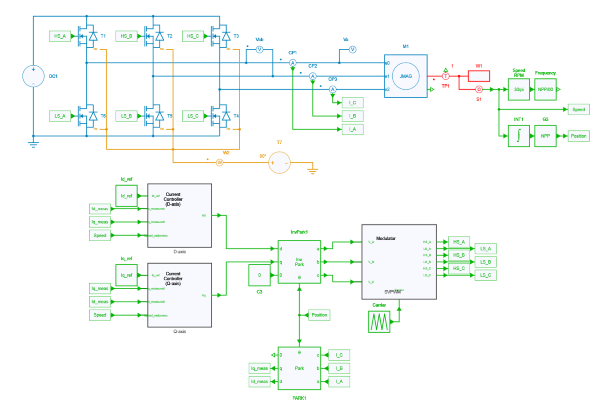
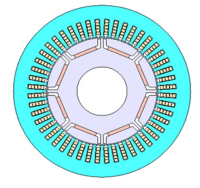
The motor drive inverter model consists of a 3-phase 2-level voltage source inverter (VSI) and the current vector control with PI current regulator. As a control target motor, an 8-pole 48-slot PMSM model is used. The details of control and co-simulation settincs can be found in Co-simulation with JMAG FEA Model.
Python script details
Input Model Preparation
The setup_inputs() function creates an independent working folder for each simulation case.
Example:
Each folder contains dedicated copies of the project files, preventing conflicts during parallel execution.
Updating Model Parameters
The script programmatically updates:
It also updates: - JMAG input file paths - XML paths - DLL paths - Transient simulation settings
Parallel Execution
The number of simultaneous simulations is controlled by:
The simulation list is automatically divided into batches to avoid exceeding the available SIMBA parallel-license count.
Multiprocessing Architecture
The implementation uses:
This allows simulation jobs to run independently and return results as soon as they finish.
Logging
The example uses:
to ensure thread-safe logging when multiple worker processes are running.
Result Extraction
The following signals are extracted:
Exported Results
Generated files:
The CSV files can be imported into Excel, MATLAB, or Python for additional post-processing.